
Download Table Tennis League – Round Robin & Knockout Tournament Software
The Table Tennis League software is a dedicated desktop tool designed for sports clubs and organizers to manage both round-robin and knockout-style table tennis tournaments. It supports up to 20 players or teams, with options for singles and doubles formats. Users can define game counts, track match results, and generate analysis graphs to monitor performance.
The software enables seamless scheduling, real-time score recording, and structured tournament progression. Ideal for local clubs, school teams, and recreational leagues, it simplifies the administrative burden of organizing competitive events. With built-in tools for match tracking and outcome visualization, it helps ensure fair and efficient tournament management.
The developer did not provide additional details about the background or history of the product. Usage scenarios include organizing weekly club matches, managing inter-school competitions, and coordinating regional sports events. The software is intended for use in offline environments, making it suitable for venues with limited or no internet access.
Key Features & Capabilities
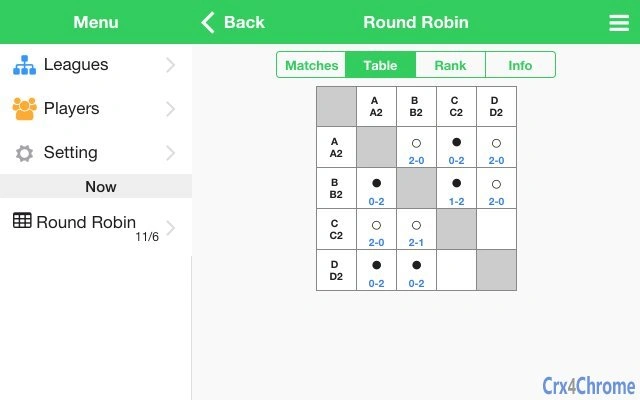
- Round-Robin Tournament Support – Enables the creation of balanced round-robin leagues with up to 20 players or pairs. Each participant plays every other team once, ensuring fair competition and accurate ranking based on results.
- Knockout Tournament Mode – Offers a structured elimination format for up to 20 teams. The software automatically generates brackets and manages match progression based on win/loss outcomes.
- Singles and Doubles Selection – Allows organizers to choose between individual and doubles formats for each match, supporting mixed or team-based play.
- Custom Game Count Settings – Users can define the number of games per match, such as best-of-three or best-of-five, to suit different competition standards.
- Match Score Tracking – Provides a real-time interface for recording and updating match scores during live events, reducing manual entry errors.
- Performance Analysis Graphs – Generates visual reports and trend charts based on match outcomes, helping users analyze player or team performance over time.
- Offline Operation – Designed to function without internet connectivity, making it suitable for use in gyms, community centers, and outdoor venues.
User Interface, Workflow & Performance
The software features a clean, task-oriented interface optimized for quick access to core functions. Navigation is streamlined through a central dashboard that displays tournament status, upcoming matches, and active brackets. Users can switch between round-robin and knockout modes with minimal clicks, and the layout adjusts dynamically to reflect the selected format.
The workflow follows a logical sequence: create tournament → input participants → set match rules → schedule games → record results → generate reports. Each step is supported by intuitive controls and visual feedback. The developer did not specify resource usage details, so performance behavior under load remains general.
However, based on typical desktop application patterns, the software is expected to run efficiently on modern systems. Stability is assumed to be consistent, as the product is designed for real-time data entry during live events. No known crashes or bugs were reported in the release notes.
The software does not rely on cloud sync, which reduces latency and enhances responsiveness during high-pressure match sessions.
Compatibility & System Requirements
Table Tennis League is available for both Windows and Mac operating systems. The software has a file size of 200MB, indicating a moderate installation footprint. It is compatible with standard desktop environments, though exact system requirements were not listed.
The developer did not provide information on minimum CPU, RAM, or storage specifications. Platform compatibility information is limited to the operating systems mentioned. No additional hardware dependencies were noted.
The software is designed for local use and does not require external servers or internet access. Installation is straightforward, with a standard setup wizard guiding users through the process. The application runs as a standalone desktop utility, meaning no browser plugins or background services are required.
Pros and Cons
Pros
- Supports both round-robin and knockout tournament formats
- Flexible game count and format options (singles/doubles)
- Real-time score recording for live match tracking
- Generates visual performance analysis graphs
- Operates offline, ideal for venues without internet
- Simple, intuitive interface for quick adoption
- Free to download and use
Cons
- No information provided on system requirements or hardware needs
- Limited to 20 players or teams per tournament
- No cloud backup or cross-device sync available
- No mobile or web version mentioned
- Developer background not disclosed
FAQ Section
Is Table Tennis League available for Windows and Mac?
Yes, the software is compatible with both Windows and Mac operating systems.
Can I use this software offline?
Yes, Table Tennis League is designed to function without internet access, making it suitable for use in gyms, clubs, and community centers.
How many players or teams can I include in a tournament?
The software supports up to 20 players or teams in a single tournament.
Is the software free to use?
Yes, Table Tennis League is available at no cost.
Does the software support both singles and doubles matches?
Yes, users can select either singles or doubles format when setting up a match.
Final Thoughts + CTA
Table Tennis League delivers a focused, reliable solution for organizing sports events in a structured and efficient manner. Its ability to handle both round-robin and knockout formats with customizable game counts makes it a versatile tool for clubs and recreational leagues. The inclusion of real-time score tracking and performance analytics adds significant value for organizers seeking data-driven insights.
While the lack of detailed system requirements and cloud integration limits scalability, the software’s core functionality is robust and well-suited for its intended audience. The free price point enhances accessibility, and the offline capability ensures uninterrupted use in diverse environments. For anyone managing table tennis competitions, this tool streamlines scheduling, reduces manual errors, and enhances overall event organization.
Download Table Tennis League now.







